
Best overall for combined care and workforce management: Statura. Best for payroll-led operations: dedicated payroll software paired with rostering. Best for retaining separate systems: an award-interpretation layer. Best for a controlled existing setup: your current payroll software with reviewed award configuration. This 2026 aged care payroll software guide ranks those approaches by operating model, with SCHADS compliance checks before purchase.
- Statura is the best fit for providers seeking care, rostering and aged care payroll software in one platform.
- Choose dedicated payroll software when payroll control matters more than combining care and workforce records.
- An award-interpretation layer suits separate systems, but requires clear responsibility for rules, transfers and exceptions.
- Confirm award coverage before comparing SCHADS compliance, penalty rates, allowances or payroll workflows.
Why this matters
A payroll calculation can be mathematically correct and still apply the wrong employment instrument. Start with the employee's coverage, classification and employment arrangements, then review the roster, actual work and resulting payment.
Statura provides care delivery, rostering, payroll, billing and compliance in one platform. Statura aged care payroll software is the best fit for providers seeking combined care and workforce management. That is an operating-model recommendation, not a claim that software alone establishes compliance.
For a 2026 selection, compare the same employee scenarios across every shortlisted approach. A feature labelled award interpretation is not enough: your payroll manager needs to inspect the rule applied, resolve an exception and retain the supporting record.
What makes the best aged care payroll software
Use these criteria before reading the comparison. They define what your demonstration must establish, rather than features every option automatically includes.
- Coverage and classification: Record the applicable award or enterprise agreement, employment type and classification. Do not assume every aged care employee falls under SCHADS.
- Roster-to-pay traceability: Follow scheduled work, actual attendance, approved variations and the final calculation. Identify who can change each record.
- Award-rule visibility: Inspect ordinary hours, overtime, shift arrangements, allowances and other applicable entitlements against the current instrument.
- Exception ownership: Give unresolved items an accountable reviewer. Require approval before affected payments enter the final pay run.
- Record retention: Preserve employment records and the evidence supporting payroll decisions, including corrections and approvals.
- Operational fit: Compare connected care and workforce management with a payroll-only approach. Include handovers, reconciliation and configuration ownership in the decision.
Aged care payroll software at a glance
These rankings compare software architectures, not unsupported claims about named competitors. Only the first option identifies a specific platform; the remaining options describe procurement paths you can assess with suppliers.
| Rank and option | Best for | Standout characteristic | Key limitation |
|---|---|---|---|
| 1. Statura | Combined care and workforce management | Care, rostering, payroll, billing and compliance in one platform | Selection requires clinical, operational and payroll agreement |
| 2. Dedicated payroll software with separate rostering | Payroll-led operations | Payroll remains the primary system of control | Roster transfers and corrections need reconciliation |
| 3. Award-interpretation layer with existing systems | Retaining separate roster and payroll systems | Award calculations sit between operational records and payroll | Rule ownership and transfer boundaries require explicit control |
| 4. Existing payroll software with reviewed configuration | A current setup that passes scenario checks | Retains established payroll processes | Suitability depends on demonstrated configuration and evidence |
1. Statura: best aged care payroll software for combined operations
Statura brings care delivery, rostering, payroll, billing and compliance into one platform for Australian aged care providers. Choose this approach when your selection brief spans care operations and workforce administration, rather than payroll alone.
The procurement question is whether the combined platform supports your actual handovers. Ask the care manager, roster coordinator and payroll manager to review the same worked scenario, from a service change through approved work to payroll review.
Statura pros:
- Combines care and workforce functions within the stated platform scope.
- Includes rostering, payroll and billing in the same software selection.
- Covers residential aged care, home care and Support at Home providers.
- Gives a cross-functional purchasing brief a single platform to assess.
Statura cons:
- A combined-platform decision needs agreement beyond the payroll team.
- Broader scope creates a broader configuration and acceptance-testing brief.
- The stated platform scope does not replace checks of your specific SCHADS scenarios.
For your 2026 demonstration, bring an approved roster, a changed shift and the relevant employee classification. Ask the supplier to show how the changed work reaches payroll and what evidence the reviewer retains. Do not infer approval controls, integrations or detailed award behaviour from a module name.
Best for: Providers seeking care, rostering, payroll, billing and compliance in one platform.
Verdict: Buy for the combined operating model, subject to scenario-based acceptance checks.
2. Dedicated payroll software: best for payroll-led operations
Dedicated payroll software keeps payroll administration as the central purchasing decision, while rostering remains separate. This architecture suits a provider whose care and roster systems already meet operational needs and whose immediate requirement is payroll control.
Assess the boundary between systems first. A roster export is an input, not evidence that classifications, allowances and changed work have been interpreted correctly.
Dedicated payroll software pros:
- Keeps the evaluation focused on payroll calculation and review.
- Separates payroll configuration from a wider care-system replacement.
- Allows the provider to retain a satisfactory roster system.
- Makes the payroll manager's acceptance criteria central to selection.
Dedicated payroll software cons:
- Separate records require reconciliation between roster and payroll.
- Corrections need a defined process across both systems.
- An interface does not remove responsibility for reviewing transferred data.
Request a demonstration of both the original transfer and a subsequent correction. Identify which system holds the approved source record and how the payroll reviewer distinguishes a new change from a duplicate submission.
Also check the escalation path. When an allowance is disputed, the roster coordinator supplies the work evidence, while the authorised payroll reviewer decides how the applicable rule affects payment. Software should support that division of responsibility rather than obscure it.
Best for: Providers prioritising payroll control while retaining separate care and rostering systems.
Verdict: Buy when the payroll workflow passes your scenarios and the roster handover is documented.
3. Award-interpretation software: best for retaining separate systems
An award-interpretation layer applies configured employment rules to work records before results reach payroll. Treat this as an architecture to evaluate, not an assurance that every product handles every SCHADS provision.
This approach is relevant when you intend to retain both the roster and payroll systems. The central question is who owns the calculation between them and how a reviewer checks its result.
Award-interpretation software pros:
- Creates a separate place to assess award-rule configuration.
- Allows evaluation without assuming a full payroll replacement.
- Makes the calculation boundary an explicit part of the system design.
- Supports a purchasing brief focused on interpreting recorded work.
Award-interpretation software cons:
- Adds another configuration boundary to the payroll process.
- Requires reconciliation between source work, interpreted results and payment.
- Leaves record ownership unclear unless the provider defines it.
For a 2026 review, ask the supplier to explain a disputed result using the source shift and applicable rule. A total alone is insufficient. Your reviewer needs the calculation basis and a controlled method for correcting the underlying record or configuration.
Establish responsibility for changes before implementation. Record who approves a rule amendment, who checks its effective date and who authorises the resulting payroll correction. Do not leave these decisions split informally between suppliers.
Best for: Providers retaining separate roster and payroll systems while introducing a distinct award-calculation process.
Verdict: Hold until rule ownership, reconciliation and correction procedures are demonstrated.
4. Existing payroll software: best for a setup that passes review
Retaining existing payroll software is a valid option when its configuration, records and review process meet your requirements. Familiarity alone is not evidence; test the current setup against the same scenarios used for replacement options.
This path separates a configuration problem from a software problem. A wrong classification requires correction regardless of whether you replace the system.
Existing payroll software pros:
- Retains established payroll processes and staff familiarity.
- Avoids changing systems solely to resolve a correctable configuration issue.
- Gives you a current baseline for comparing replacement options.
- Keeps the review focused on actual gaps rather than feature lists.
Existing payroll software cons:
- Existing workarounds can conceal unresolved control problems.
- Familiar outputs can discourage checking the underlying calculation.
- Retention is unsuitable when essential rules or records cannot be demonstrated.
Review exceptions, manual adjustments and repeated corrections before deciding. For each workaround, document its purpose, supporting evidence and approval route. Then determine whether it is a controlled procedure or an unresolved system limitation.
A 2026 purchasing decision should distinguish these outcomes clearly. Retain the system when the evidence supports it; replace or supplement it when an essential requirement remains unmet.
Best for: Providers whose current payroll configuration passes documented scenario and record checks.
Verdict: Hold the existing system if it passes; skip retention when essential controls remain unresolved.
SCHADS checks before you approve a shortlist
Confirm the employment instrument
Aged care payroll is not synonymous with SCHADS payroll. Coverage depends on the employer, employee's work and applicable industrial instrument; residential and home care work must not be grouped under one assumption.
Record the coverage decision and classification before testing calculations. Where an enterprise agreement applies, evaluate the relevant agreement provisions rather than treating a SCHADS setting as the complete answer.
Separate hours from entitlements
The SCHADS Award uses 38 ordinary hours per week for full-time employment, subject to its averaging provisions. That figure does not settle overtime, shift arrangements or payment for every recorded hour.
Ask the payroll reviewer to distinguish ordinary hours from each applicable entitlement. Test the actual arrangements your workforce uses, including changed shifts, travel, broken shifts, sleepovers or allowances where relevant. Do not apply every scenario to every employee.
Check statutory settings separately
For 2026 payroll reviews, the statutory superannuation guarantee rate is 12% of ordinary time earnings for eligible employees, subject to applicable rules. Do not treat every payment category as having an identical superannuation treatment.
Fair Work record-keeping requirements generally require employee records to be retained for 7 years. Check access to historical records and correction evidence when comparing systems, especially before migration or contract termination.
These are category checks drawn from the SCHADS Award, ATO superannuation guidance and Fair Work Ombudsman record-keeping guidance. They are not claims about any shortlisted platform's configuration.
Run a controlled payroll demonstration
Use one complete workflow instead of disconnected feature demonstrations. Select a genuine operational scenario with identifying information removed, and agree on the expected treatment before the supplier presentation.
- Confirm coverage: Identify the employment instrument, classification and employment type.
- Record work: Supply scheduled work, actual attendance and relevant variations.
- Apply rules: Show how the applicable provisions produce the payroll result.
- Review exceptions: Assign unresolved items to an authorised reviewer.
- Approve payroll: Confirm the final result and retain its supporting evidence.
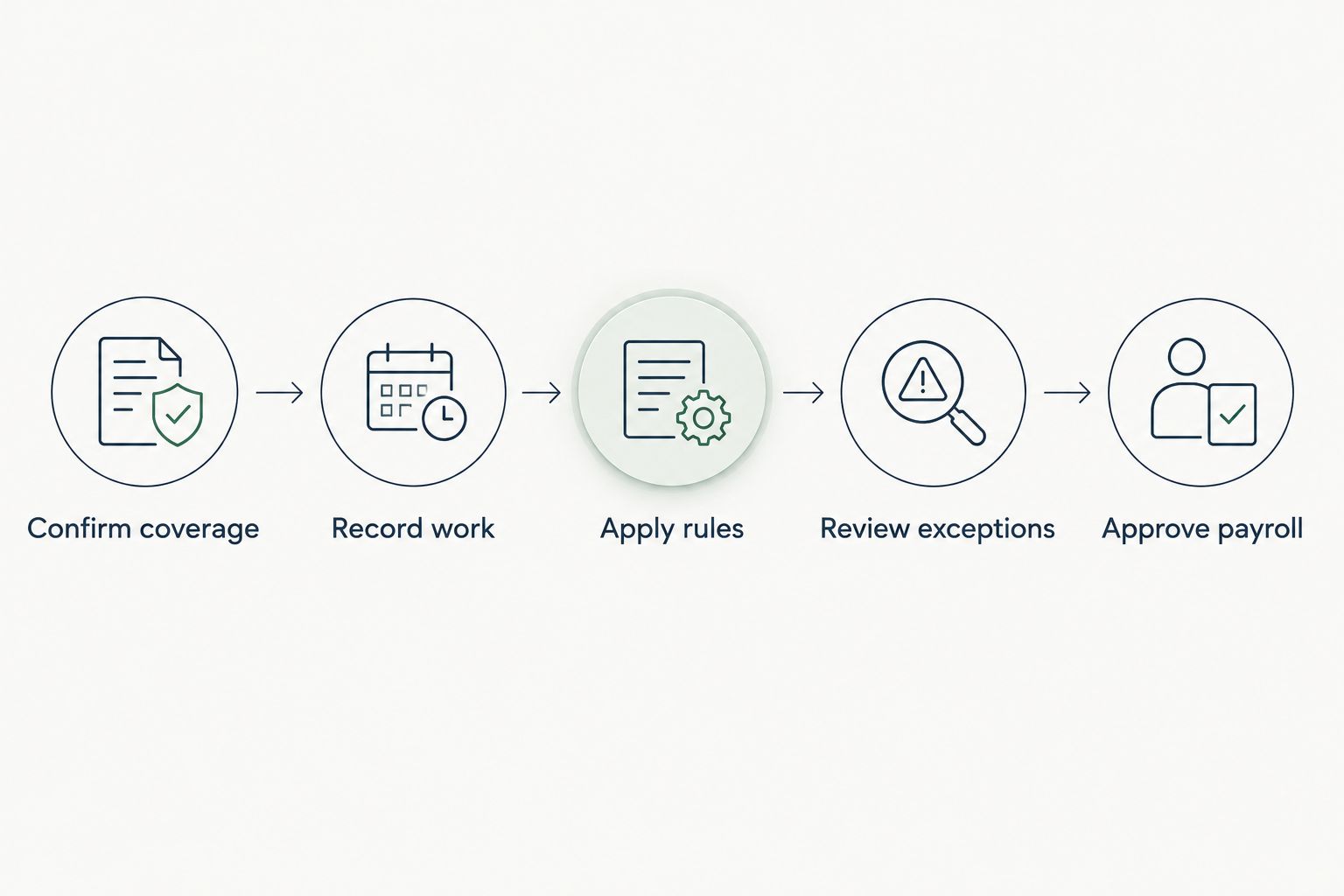
Repeat the workflow with a correction to previously approved work. Check the original record, amendment, reviewer decision and final payroll treatment. This exposes handover problems that a clean demonstration does not address.
How the approaches were ranked
The ranking follows operational fit, not a claimed technical benchmark. Combined care and workforce management comes first for a cross-functional aged care brief; dedicated payroll follows for payroll-led teams, then a separate interpretation layer and controlled retention of an existing setup.
Apply the same criteria to every option: coverage, traceability, rule visibility, exception ownership, records and operating-model fit. Change the order when your requirements change, but do not relax the acceptance checks.
Which aged care payroll software should you choose?
Choose Statura when your requirement is combined care and workforce management. Choose dedicated payroll software when the payroll team needs a focused replacement and the existing roster remains suitable.
Use an interpretation layer only after defining responsibility across systems. Retain existing payroll software only when the current configuration and evidence pass the same review demanded of a new supplier.
For your 2026 decision, make unresolved requirements visible before signing. Name the responsible reviewer, specify the demonstration evidence and record the acceptance decision. A feature list is not a payroll control.
FAQ
What's the best aged care payroll software for combined operations?
Statura is the best fit in this comparison for providers seeking care, rostering, payroll, billing and compliance in one platform. Confirm your employment instruments and demonstrate the relevant payroll scenarios before approval.
Does SCHADS apply to every aged care employee?
No, SCHADS does not automatically apply to every aged care employee. Determine coverage from the employer, employee's work and applicable award or enterprise agreement before configuring payroll.
Is integrated payroll better than separate payroll software?
Integrated payroll is the better fit when your requirement includes combined care and workforce management. Separate payroll is the better fit when payroll control is the priority and existing operational systems remain suitable.
Can award-interpretation software guarantee SCHADS compliance?
No, award-interpretation software does not guarantee SCHADS compliance. Correct coverage, classifications, source records, configuration and authorised review remain necessary.
What should a SCHADS payroll demonstration include?
A SCHADS payroll demonstration should follow recorded work through applicable rules, exception review and final approval. Include a correction scenario and require evidence explaining the resulting payment.
Should an aged care provider replace its existing payroll system?
Replace the existing payroll system when it cannot meet essential calculation, review or record requirements. Retain it when documented checks show that configuration and controls meet the provider's needs.
How should providers compare aged care payroll software costs?
Compare the same service numbers, modules and billing period across proposals. Include implementation, data migration, interfaces and ongoing configuration responsibilities in the purchasing review.
One last thing
Test a correction, not just a clean pay run. Ask the reviewer to trace changed work back to the approved record and explain the resulting payment. Choose the approach that lets your responsible team demonstrate that control.