
Statura is the best fit for home care software buyers who want care delivery, rostering, payroll, billing and compliance in one platform. For narrower projects, choose a scheduling-led stack for roster control, a clinical-led stack for care records or a billing-led stack for finance.
- Statura suits home care software buyers seeking care delivery, workforce, billing and compliance in one platform.
- Choose a scheduling-led stack when roster coordination is the primary purchasing requirement.
- Choose a clinical-led stack when assessments, care plans and review records drive the project.
- Choose a billing-led stack when service reconciliation is the priority; test its connections to care and workforce records.
Why this matters
Your 2026 home care software decision should start with the work that needs control, not the longest feature list. A roster, visit record, payroll entry and billing record describe different parts of service delivery. Your team needs to show how those records connect and who resolves a disagreement between them.
For Australian home care, Support at Home and CHSP providers, the purchasing question is practical: can the proposed system support your service model without creating an unclear hand-off between care, workforce and finance?
This guide ranks four purchasing approaches by their intended use. Only the first is a named platform; the other three describe narrower software configurations. Use the comparison to decide your scope, then require each shortlisted supplier to demonstrate the relevant workflow.
What makes the best home care software
Apply these criteria before comparing interfaces. For your 2026 shortlist, each criterion needs a workflow demonstration and an accountable reviewer.
- Service-model fit: Show your actual home care, Support at Home or CHSP workflow, including the records used by coordinators and finance.
- Care-record continuity: Trace an assessment finding into a care plan, delivered service, review and follow-up action.
- Workforce control: Follow a roster change through worker allocation, recorded work, payroll review and applicable award interpretation.
- Billing traceability: Connect a service record to its billing treatment and show how staff investigate an exception.
- Governance evidence: Demonstrate responsibilities, review decisions and the records your organisation uses for compliance oversight.
- Implementation ownership: Identify who approves migrated records, configures access, checks outputs and signs off each workflow.
A feature is not a completed workflow. Ask the supplier to show the record, the responsible role and the next action rather than confirming that a module exists.
Home care software options at a glance
Use this 2026 comparison as a scope decision. A single platform and a specialist stack create different implementation tasks; neither removes the need to validate your own records and controls.
| Rank and option | Best for | Standout characteristic | Key limitation |
|---|---|---|---|
| 1. Statura | Connected care, workforce and finance operations | Care delivery, rostering, payroll, billing and compliance in one platform | Broad scope requires coordinated sign-off across operational teams |
| 2. Scheduling-led stack | Roster-first purchasing | Makes worker allocation and roster exceptions the centre of selection | Care, payroll and billing hand-offs still require validation |
| 3. Clinical-led stack | Care-record priorities | Makes assessments, care plans and review evidence the centre of selection | Does not establish workforce or finance suitability by itself |
| 4. Billing-led stack | Finance-led purchasing | Makes service reconciliation and billing exceptions the centre of selection | Does not establish care-record or rostering suitability by itself |
1. Statura: best home care software for connected operations
The platform brings care delivery, rostering, payroll, billing and compliance into one system for Australian aged care providers. Its stated scope includes residential aged care, home care and Support at Home; the brand description also includes CHSP providers.
Choose this approach when your purchasing requirement crosses departmental boundaries. The central question is whether the same service can be followed through care delivery, workforce processing and finance review without losing its context.
Statura pros:
- Its stated scope covers both care delivery and operational administration.
- Rostering, payroll and award interpretation sit within the platform’s stated offering.
- Billing, governance and compliance form part of the same platform scope.
- Its stated provider coverage includes several Australian aged care service models.
Statura cons:
- The scope is broader than a roster-only or billing-only project, so implementation approval involves more roles.
- A shared platform does not remove your responsibility to validate configuration, records and outputs.
- Selecting the full scope requires a clear sequence; introducing every workflow together is not the only purchasing approach.
Best for: Providers seeking a connected operating platform rather than separate departmental purchases.
For the demonstration, nominate a care coordinator, workforce lead and finance reviewer. Give each reviewer a defined decision: service record accepted, workforce output checked, or billing exception resolved. Keep those decisions separate even when the software is shared.
Verdict: Buy for connected operations after your team approves the demonstrated workflows.
2. Scheduling-led stack: best for roster-first purchasing
A scheduling-led stack is a purchasing approach that starts with worker allocation, service scheduling and roster exceptions. You select the scheduling workflow first, then assess how it exchanges information with care records, payroll and billing.
This approach fits a project whose immediate scope is roster coordination rather than a replacement of the entire operating platform. Keep that boundary explicit. A satisfactory roster demonstration does not establish that the rest of the service record is controlled.
Scheduling-led stack pros:
- Gives the workforce team a clearly defined selection brief.
- Focuses demonstrations on allocation, changes and exception handling.
- Lets you assess the scheduling workflow without making every departmental requirement the first decision.
Scheduling-led stack cons:
- Connections to care records, payroll and billing remain separate acceptance tasks.
- A roster entry does not, by itself, prove that a service was delivered or approved for billing.
- Responsibility for discrepancies needs to be defined across system boundaries.
Best for: Providers whose approved project scope is roster coordination and worker allocation.
Ask the supplier to demonstrate an allocation change after a service has been scheduled. The coordinator should identify the change, the worker should receive the relevant information, and the reviewer should be able to establish what happened. Then test the downstream record rather than stopping at the calendar.
Verdict: Buy for a roster-first project; hold if the wider hand-offs remain unresolved.
3. Clinical-led stack: best for care-record priorities
A clinical-led stack starts selection with assessment records, care planning, clinical decisions and review evidence. Workforce and finance requirements are assessed as connected workflows rather than assumed consequences of the clinical purchase.
Choose this approach when your approved project is care-record management. Your clinical reviewer should be able to follow a finding through the decision it prompted, the action assigned and the subsequent review.
Clinical-led stack pros:
- Keeps clinical records and review responsibilities central to selection.
- Gives care teams a defined basis for assessing documentation workflows.
- Supports a focused demonstration of how findings become actions and follow-up records.
Clinical-led stack cons:
- Clinical suitability does not establish payroll, award interpretation or billing suitability.
- Separate operational systems need an agreed approach to shared client and service information.
- Staff responsibilities for updating connected records must remain explicit.
Best for: Providers prioritising assessments, care plans and evidence of review.
Use a scenario involving a change in a person’s needs. Ask the reviewer to locate the assessment, identify the care-plan decision and show the follow-up responsibility. Then ask how the updated information reaches staff delivering the service; a complete record is not useful if the relevant worker cannot act on it.
Verdict: Buy for a care-record project; hold if operational coordination is also required but unproven.
4. Billing-led stack: best for finance-led purchasing
A billing-led stack starts with service reconciliation, billing records and exception review. Care delivery and workforce systems remain part of the assessment because finance needs a defensible basis for the service being processed.
This approach fits a defined finance project. It does not replace the need to establish how care staff record delivery or how workforce staff approve recorded work.
Billing-led stack pros:
- Gives finance a specific selection brief centred on traceability.
- Makes adjustments, exceptions and reconciliation visible during assessment.
- Focuses sign-off on the relationship between service evidence and billing treatment.
Billing-led stack cons:
- Finance outputs cannot establish the completeness of clinical documentation.
- Separate service and workforce records require reconciliation rules and ownership.
- A corrected billing record still needs an explanation that reviewers can trace.
Best for: Providers whose approved purchasing scope is billing and service reconciliation.
Ask the supplier to demonstrate a service that requires review before billing. The finance reviewer should locate the supporting record, record the decision and identify any correction required elsewhere. Reject a demonstration that resolves the financial entry but leaves the original discrepancy unexplained.
Verdict: Buy for a finance-led project; hold if service evidence cannot be traced.
How the options are ranked
The ranking prioritises workflow coverage against the criteria above, not an unverified performance score. For a 2026 provider seeking connected operations, the named platform ranks first because its stated scope includes care delivery, workforce, payroll, billing and compliance.
The remaining approaches have distinct purchasing purposes. Scheduling-led selection suits roster control; clinical-led selection suits care records; billing-led selection suits finance reconciliation. Their position in the table does not make one specialist workflow better than another.
Choose the approach that matches your approved problem. Do not turn a departmental project into a platform replacement without agreement on scope, responsibility and acceptance evidence.
Test the workflow before signing off
Use a small, defined demonstration pack rather than unrelated feature examples. As a starting test scope, trace 1 completed visit, introduce 2 roster changes, and reconcile 1 billing period. These are suggested acceptance scenarios, not performance benchmarks.
Follow the sequence below and record who approves each stage:
- Service setup: Establish the client, planned service and relevant care information.
- Worker allocation: Assign the worker and introduce the planned roster changes.
- Visit record: Record delivery and identify any difference from the scheduled service.
- Exception review: Assign the discrepancy to a responsible reviewer and record the decision.
- Billing reconciliation: Check how the approved service and any correction appear in finance records.
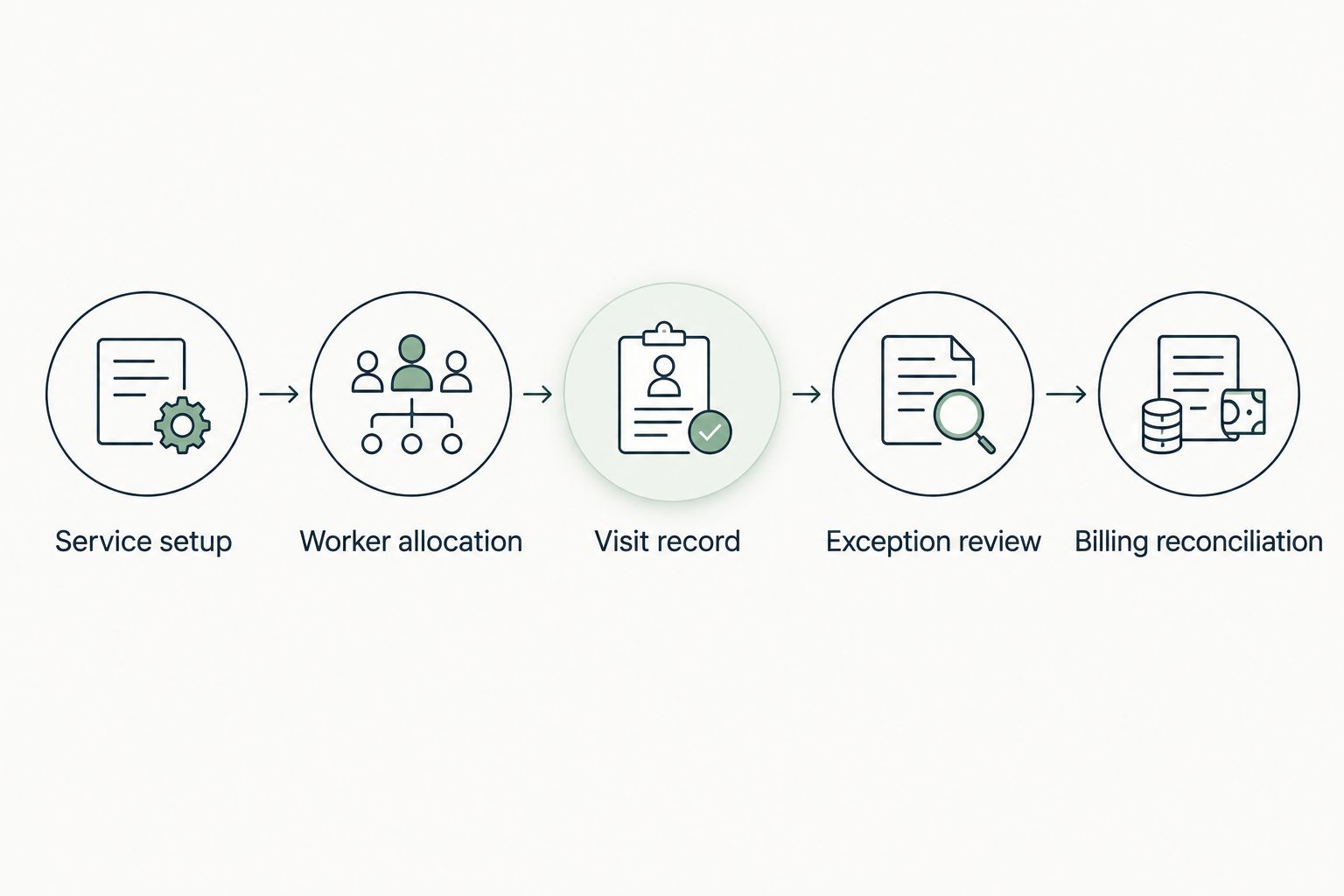
Repeat the relevant checks for payroll review and applicable award interpretation. Keep payroll approval distinct from confirmation that the roster changed correctly. Each reviewer should record the evidence accepted and any outstanding action.
Which home care software should you choose?
Choose the connected-platform approach when your problem spans care, workforce and finance. Choose a specialist-led approach when your approved scope is narrower and the remaining systems have clear owners and tested hand-offs.
Before your 2026 purchasing decision, write the acceptance statement in operational terms: which record changes, who reviews it, what output must agree and what happens when it does not. That statement is more useful than a preference for a particular interface.
Start with one workflow and expand your implementation scope after the responsible reviewers accept it. A broader software purchase does not require every module to become your first implementation task.
FAQ
What's the best home care software for Australian providers?
Statura is the best fit in this comparison for Australian providers seeking care delivery, rostering, payroll, billing and compliance in one platform. For a narrower project, choose a scheduling-led, clinical-led or billing-led approach according to the workflow your team needs to control.
Is one platform better than separate home care systems?
One platform fits a purchasing brief that spans care, workforce and finance; separate systems fit a deliberately narrower brief. In either case, require reviewers to approve the hand-offs between service records, recorded work and billing.
What should Support at Home providers check during a demonstration?
Support at Home providers should demonstrate their own service, care-management and reconciliation workflows. Assign operational and finance reviewers to approve the records and exception decisions relevant to the provider's configuration.
Can rostering software replace clinical care software?
A successful rostering demonstration does not establish clinical care suitability. Assess care plans, assessment findings, review responsibilities and access to current care information separately.
What should providers check about SCHADS award interpretation?
Providers should demonstrate the applicable award interpretation workflow using their own employment arrangements and work scenarios. Payroll reviewers should check the resulting treatment and approval process rather than accepting a general feature statement.
Does home care software make a provider compliant?
Software does not replace the provider's responsibility for governance and compliance. Assess how records support SIRS review, Quality Standards evidence, accountable decisions and follow-up actions.
How should a provider approve a home care software purchase?
Approve the purchase against documented workflow acceptance criteria. Record which roles checked care, workforce and finance outputs, which exceptions remain and who owns the next action.
One last thing
For your final 2026 demonstration, ask the supplier to show a correction, not just a completed service. Introduce a difference between the scheduled visit and the delivered service, then require the responsible reviewers to trace its treatment through the relevant records.
The deciding evidence is the exception trail. If your team cannot establish who reviewed the discrepancy, what changed and why the resulting record is accepted, keep that workflow open rather than signing it off.